


As a British student applying to university in the UK, you must register with the Universities and Colleges Admissions Service (UCAS). This clearinghouse processes thousands of students' applications, directing them through the university system.
To keep things simple, UCAS assigns a status code to each applicant. How to find the UCAS status code and what to do with it is what Superprof covers today.
Here's a brief overview of the terms explained throughout the article:
| Term | Explanation | Where to Find It |
|---|---|---|
| UCAS Track | An online system that allows you to follow the progress of your UCAS application. You can see if you've received offers, reply to offers, and view your final university placement. | Accessible via the UCAS website once you have submitted your application and received your UCAS Personal ID. You need your UCAS Personal ID and a password to log in. |
| UCAS Number/Personal ID | A unique 10-digit number assigned to each applicant when they register on the UCAS website. It's used to identify your application throughout the admission process. | This number is available on your UCAS Hub dashboard when you log into the UCAS website. |
| UCAS Status Code | This the number you need when applying for a student bank account and your student loan, and is composed of a 16-digit and 4-digit codes. | Your UCAS status code can be found under the bank codes tab within the personal UCAS hub on the UCAS website. |
| UCAS 4 Digit Code | Your 4-digit status code is the one you will need when applying for a student bank account. | Once you have logged into the UCAS website, you can find the 4-digit code in your personal UCAS hub under the bank codes tab, right alongside the 16-digit code. |
| UCAS 16 Digit Code | Your 16-digit status code is the one you will need when applying for a student loan. | Once you have logged into the UCAS website, you can find the 16-digit code in your personal UCAS hub under the bank codes tab, right alongside the 4-digit code. |


What is UCAS?

UCAS is a centralised service in the United Kingdom that manages the application process for British universities and colleges. UCAS handles applications for undergraduate courses at nearly all UK higher education institutions.
This platform organises key functions and processes:
Function:
- Application Management
- Course Information
- Support and Guidance
- Tracking and Updates
Purpose:
- to make applying easy
- to provide course information
- for the application process
- to view application status and receive offers
What is a UCAS number?
When you register for a UCAS application, you will be assigned a unique 10-digit "Personal ID" number. You can find this number in any official communication from UCAS, such as emails or letters. UCAS identifies you by your UCAS number, which is also called Personal ID or UCAS ID. This number is one of the most important bits of information to have on hand throughout your UCAS process.
The UCAS number is a ten-digit number you receive when you register for a UCAS application.
Your UCAS Number is displayed in the format 123-456-7890.
This code is unique to you, to identify your application throughout the admissions process.
Can I find my UCAS number without starting an application?
You must create an account and start an application for the system to generate a UCAS personal identification number for you.
How Do I Find My UCAS number?
- Create an account/log into www.ucas.com.
- Your UCAS code is in the top right-hand corner of the homepage.
- The code is also visible when you track your application and review your user account settings.
What is my UCAS ID used for?
Your UCAS ID is only for use in the UCAS application.
Also, any time you contact the UCAS customer services team about your application, you must use this number to identify yourself.
What is the UCAS Status Code?
A UCAS status code is a unique 4-digit number that confirms your student status. It’s available in your UCAS Hub account and is primarily used when opening a student bank account or proving your eligibility for student benefits. This code allows banks and other organisations to verify that you’re officially recognised as a student.

Your UCAS Status Code proves you are a future student. This student status code functions a bit like a university-issued student ID. The UCAS accommodation process may require you to provide this code in other instances, too.
It is only generated after you've received a successful offer of placement from a university.
What Are the Different UCAS Status Codes?
Your UCAS status code comes in two parts: a 4-digit and a 16-digit status code, each of which has a specific purpose.
Your 16-digit UCAS code
used for applying for financial aid.
Your UCAS 4-digit code
used to open a student bank account.
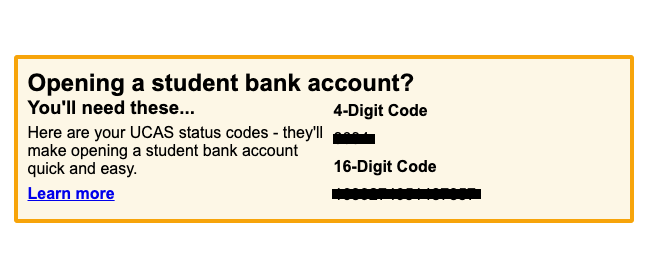
What Does the UCAS Status Code Look Like?
Be sure to keep at least your four-digit code handy, as you will need a student bank account, at a minimum.
What's the difference between a UCAS ID number and a UCAS status code?
Your UCAS ID number is a 10-digit code that identifies your university application, while your UCAS status code is a 4-digit number that confirms your student status. The ID number is used by UCAS and universities to track your application, whereas the status code is used by banks and other organisations to verify that you’re officially a student.
UCAS ID number
- a ten-digit number
- used as your UCAS Hub login
- used only on the UCAS platform
UCAS status code
- a 16-digit code + a 4-digit code
- to open a student bank account
- when applying for a student loan
Where To Find Your UCAS Status Code
In Your UCAS Hub Account
Go to www.ucas.com/hub and sign in using your UCAS account details.
Once logged in, select your current application from the dashboard.
Look for a link called “Bank status codes” (or similar). This will show a 4-digit status code (for student bank account verification) and often a 16-digit code (for student loans).
Check Your Confirmation Email
After submitting your application, you should have received a confirmation email.
Your status code is included in your UCAS application confirmation email.
Why Do You Need A UCAS Status Code?
You need a UCAS status code to prove your student status before you officially start university. It’s a 4-digit number issued through your UCAS Hub once you’ve accepted an offer, and it serves as official confirmation that you’re a UK university student. Here’s why it matters 👇
| Purpose | Why It’s Needed |
|---|---|
| Open a student bank account | Banks like HSBC, NatWest, and Santander use the code to confirm you’ve been accepted to a university before activating special student account benefits. |
| Access student discounts and deals | Some travel, insurance, and retail providers may request it to verify that you’re eligible for student offers. |
| Proof of enrolment before term starts | The code serves as temporary confirmation of your student status until your university issues its own student ID or enrolment letter. |
| Financial verification | Certain financial services may use it to confirm your eligibility for student-related products or discounts. |
Opening A Student Bank Account
1. It's an excellent start to your financial life.
2. Banks typically offer student perks, such as purchase discounts and interest-free overdrafts.
Take the time to shop around for the bank that offers you the most advantages. You will rely on your bank throughout your time at university, and perhaps, into your career. So, it's worth your while to find the one you can build a solid relationship with.

How To Contact UCAS If You Can't Find Your Code
You may also contact UCAS by phone. That office can help you recover access to your account once you've answered the necessary security questions.
From the UK: 0371 468 0 468
International callers: +44 330 3330 230 (international rates may apply)
You may also reach out on social media: Facebook, Instagram, and X.
For help with different application schemes, please refer to the "Contact Us" section on the UCAS website. The Customer Experience Centre is open from 08:30 to 18:00 UK time, Monday through Friday.
Your UCAS Application Status
Once you have your UCAS ID, and have found your 16-digit UCAS code, as well as your 4-digit UCAS code, you may apply for the courses you spent years of your life working on.

Once that's done, you only need to wait for updates on your application's status.
- Received will be your first change. It means UCAS acknowledges receipt of your application, and it's in the 'processing' queue.
- In Progress means UCAS admissions officers are reviewing your application. Or, your chosen universities are considering it ahead of making an offer.
- A conditional offer signals that one of your chosen schools is interested in your application. However, you have a bit of work to do before the admissions officers accept you. This might mean anything from a specific set of A-level grades to extra school work and an additional interview.
- An unconditional offer means that the school needs nothing more from you. You've met all their requirements, so they guarantee your place in your chosen course.
- A Rejected application means that your application couldn't stand under scrutiny, for whatever reason.
What Is UCAS Extra?
Now that you're a pro at navigating the UCAS platform via your personal dashboard, you can accept, reject, or manage your application. Furthermore, you can change your mind about the courses you want. All of this is possible via UCAS Extra.
You can access Extra from your personal dashboard, just as you do any other UCAS feature.
You will not need any extra codes or ID to avail yourself of this platform. However, you must wait until you've exhausted your initial UCAS choices, before making any Extra decisions.

What is the UCAS Hub?
The UCAS Hub is a personalised online space that UCAS provides to each applicant.
The UCAS Hub offers a range of tools and resources to help students through their application process:
- Personalised Dashboard: The UCAS Hub gives students a dashboard where they can manage their applications, view deadlines, and receive updates.
- Course Search and Discovery: Students can search for courses and universities, save their favourite options, and compare different courses.
- Application Tracking: The Hub allows students to track the progress of their applications, see which universities have responded, and manage their offers.
- Personal Statement Builder: A tool within the Hub helps students draft and refine their personal statements, a crucial part of the application process.
- Guidance and Resources: The Hub offers resources such as application guides, tips on writing personal statements, required exam grades and information about student finance.
In all, UCAS Hub delivers:
UCAS Hub vs UCAS Track
UCAS Track was how students in past years tracked their university applications. It was useful, in its day, because students could manage their university offers. But it was a bit inconvenient, too. Students had to turn to other pages for other aspects of enrolling in university.
The UCAS Track system is now a part of the UCAS Hub. You can apply to university, respond to offers, and check your email for university application responses from your UCAS Hub dashboard.
What's New for UCAS 2026?
As noted above, the UCAS platform is constantly updating its functionality to make the university application process more streamlined. You, the new applicant, won't notice any changes, because everything will be new to you. However, if your older sibling or parent is helping you, they might notice these differences.
- Free school meals application-fee waiver option: A new payment option is being introduced to make application-fee waivers easier for eligible students
- Application fee: The fee for the Undergraduate and Conservatoires application rises to £28.95 for the 2026 cycle.
- Applicants will use a new personal-statement format: instead of one free-text box, you’ll answer three specific questions:
- Why do you want to study this course or subject?
- How have your qualifications and studies helped you to prepare for this course or subject?
- What else have you done to prepare outside of education, and why are these experiences useful?The total character limit remains at 4,000 characters (including spaces) across all three questions.
Key Dates for the UCAS 2026 Undergraduate Application Cycle
29 April 2025
2026 entry courses appear on the UCAS search tool.
13 May 2025
Applications open - you can begin your application.
2 September 2025
Earliest date to submit your application.
15 October 2025
Deadline for applications to University of Oxford, University of Cambridge and many Medicine/Dentistry/Veterinary courses.
14 Jan 2026 (6pm UK time)
Equal consideration deadline for most undergraduate courses.
31 Mar 2026
Advisory decision deadline (universities are encouraged to give decisions by this date).
6 May 2026
Decline by Default (DBD) deadline – your decision deadline for offers.
13 May 2026
Reject by Default (RBD) deadline – latest date for universities to respond (if you applied on time).
30 Jun 2026 (6pm UK time)
Final deadline for applications before automatically entering Clearing.
4 Jul 2026
Last date to add an Extra choice in your application.
5 Jul 2026
Clearing opens for the 2026 cycle.
19 Oct 2026
Final deadline to add Clearing choices.
Summarise with AI:
Did you like this article? Leave a rating!


 Loading...
I cant’t find my ucas 4 digit code and i need to apply to the student account
If you can’t find your UCAS 4-digit code, follow these steps:
1. **Check Previous Communications:** Look through any emails or letters you received from UCAS, as the code might be included there.
2. **Log In to UCAS Account:** Try logging into your UCAS account on the UCAS website. Your 4-digit code might be available in your account details or application history.
3. **Contact UCAS:** If you can’t locate the code, contact UCAS directly for assistance. You can reach them via their contact form on the UCAS website or by calling their helpline.
They’ll be able to verify your identity and help you retrieve your code.